NeuroSDR User Manual (3) — Sub VFO, Satellite, Digital Voice, Smart Record, Web Remote

NeuroSDR user manual (3) — Sub VFO, satellite, digital voice, Smart Record, web remote

Advanced workflows. The Sub VFO / multi-FT8 story assumes hardware with enough instantaneous bandwidth. Author: KD8CEC.

1. Sub VFOs on wide hardware (founding goal)

A Sub VFO is an independent virtual receiver inside the RF capture window. On an RSP (or other wide source), you can:

  • Listen to shortwave or CW on MAIN
  • Run FT8 plugins on SUB1 / SUB2 / SUB3 at 14.074, 7.074, 7.040 MHz, …
  • See decoded callsigns on the main waterfall when MAIN WF overlay is enabled

If a Sub VFO leaves the capture, the UI shows OUT OF RANGE — raise sample rate / recenter, or accept that the decoder pauses.

YouTube: RSP1 bandwidth + Sub VFOs + multi FT8 — full episode
YouTube: Create Sub VFOs — 02:42
YouTube: OUT OF RANGE — 04:54
YouTube: 7.040 JA FT8 on Sub VFO — 11:38
Virtual Kiwi/WebSDR audio bandwidth is much narrower than a multi-MS/s RSP window. Use hardware when you want several FT8 dials at once.

2. SCENE and Satellite mode

Scenes store source, plugins, Sub VFOs, and view. The Satellite scene adds observer position, pass priority, and Doppler-aware retuning. You can also experiment against VHF/UHF-capable remote nodes, but GPS home and Doppler math are aimed at real tracking work.

YouTube: Satellite SCENE + Doppler — 00:00
YouTube: Home / GPS setup — 00:27
YouTube: Doppler correction — 01:03
Enter your observer coordinates in the Satellite UI. Do not publish personal home GPS in shared settings files.

3. Digital voice (DMR / D-STAR / C4FM)

NeuroSDR embeds a DSD-FME-based path. Select the digital mode, use the digital panel for feed AGC / PCM volume / output channel. Decoded voice owns the speaker path — you should hear voice, not raw discriminator hash.

YouTube: Digital voice + AGC — full video

4. Smart Record

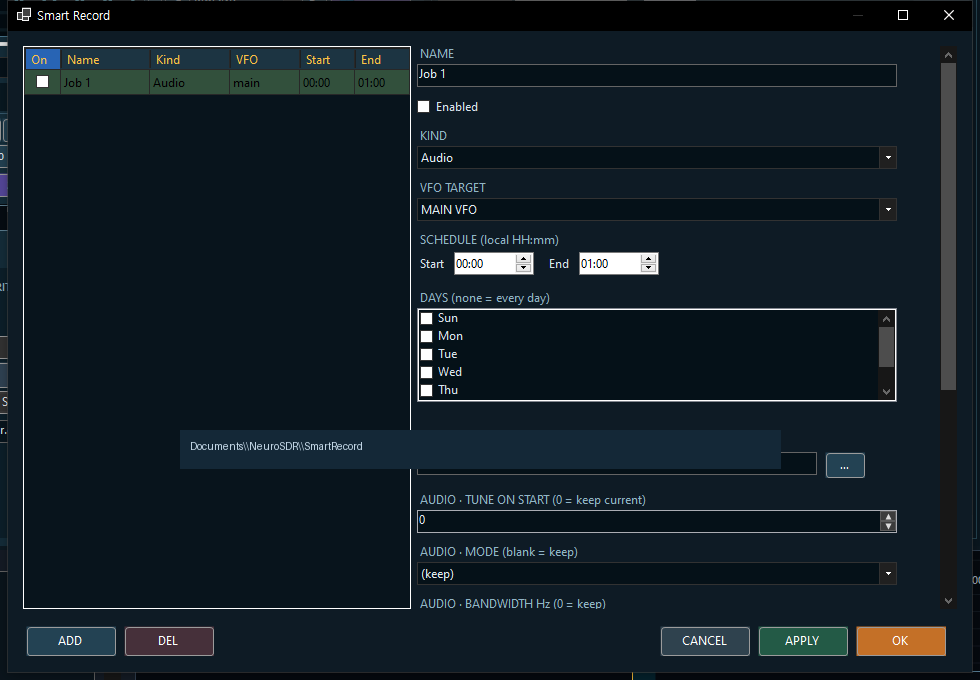
Smart Record — local-time schedules, optional tune/mode/BW on start.
YouTube: AF Record & Smart REC — 05:32
YouTube: Schedule configuration — 06:00

5. Web remote (optional)

SET → General → ENABLE WEB REMOTE. Optional LAN bind + access token. Status bar shows a URL (often http://127.0.0.1:8765/). Browser UI can start/stop RX, tune, change mode, show spectrum/meters, and play decoded digital voice.

A dedicated YouTube episode for web remote is not up yet. I will link it here when published. Until then, use SET → General labels and this section.

6. Config export

Title-bar chrome menu → Config → Export / Import / Reset. Scrub API keys and home GPS before sharing exports.

7. Links

Thanks for using NeuroSDR on real radios.
— KD8CEC


NeuroSDR — KD8CEC · Blog: https://www.hamskey.com · Downloads: GitHub Releases · Source: github.com/phdlee/NeuroSDR

Comments

Popular posts from this blog

Introduction to UV-K5 HF 0.5 (Fullband receive version)

 Introduction to UV-K5 HF 0.5 (Fullband receive version) This is an introduction to UV-K5 HF full-band reception firmware 0.4HF using SI4732-A10. This version is released separately from the existing UV-K5 CEC firmware version. because space is needed to store a large PATCH file to use SI4732-A10's SSB. This article only describes the features newly added in Version 0.5. Please check the links below for full features. How to modify your hardware http://www.hamskey.com/2024/02/uv-k5s-hf-full-band-reception-lsb-usb.html Version 0.3HF (Most feature descriptions are provided) http://www.hamskey.com/2024/02/introduction-to-uv-k5-hf-fullband.html Version 0.41HF (Description of Band plan function and Dual RX function) http://www.hamskey.com/2024/03/introduction-to-uv-k5-hf-fullband.html

C-BOARD (DSP-Board) for UV-K5 (Updated June 9, 2024)

  C-BOARD for UV-K5 I created an externally mountable DSP-Board to process digital signals from UV-K5. DSP-Board was named C-Board. C-Board is divided into versions ranging from the simplest version to one that can be equipped with GPS.

Release DVPI Version 1.03 (scirpt update)

 Release DVPI Version 1.03 There have been some changes to the DMR node recently. This version changes only those related to the recently changed DMR node. If you normally use Version 1.0 or Version 0.95, no upgrade is required. DVPi uses the USRP Client protocol.  When you install and use DVSwitch, you must read and comply with the license that appears. The user is responsible for the license for the use of DVPi.