NeuroSDR user manual (1) — Main window and everyday RX
Everyday operation with a local SDR (or a remote source if that is all you have). Author: KD8CEC.
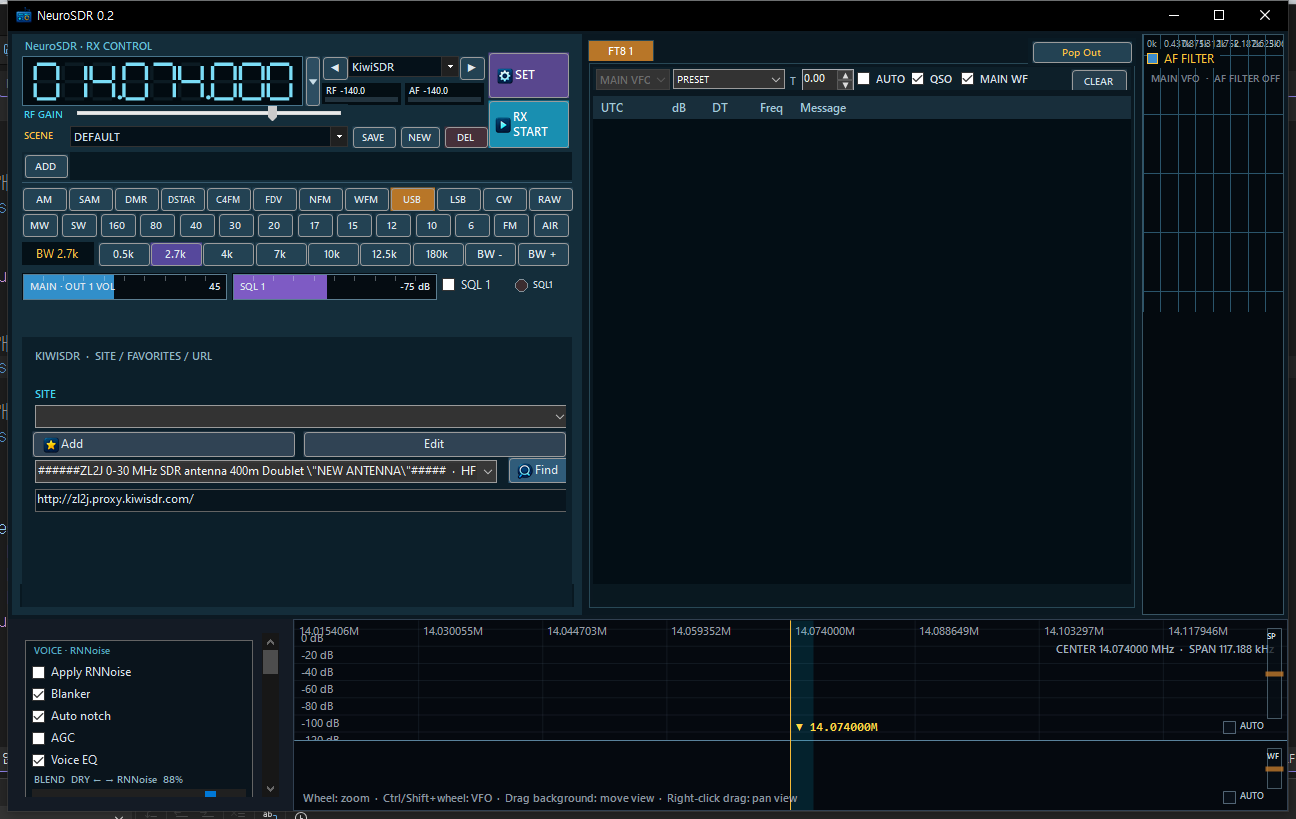
Main window — RX CONTROL, AF plugin tabs, RF spectrum/waterfall.
YouTube: Device selection & display — 00:11
YouTube: Tuning shortcuts — 00:40
1. Choose SOURCE, then RX START
- In SOURCE, pick your hardware (SDRplay, RTL-SDR, HackRF, Airspy, …). Virtual Kiwi/WebSDR/OpenWebRX only if you are using the secondary Internet path.
- Press RX START. The button becomes RX STOP while running.
- Watch RF/AF meters and the status line for drops / underruns on hardware.
2. RX CONTROL
- Frequency digits — Click a digit, wheel to change that decade; or enter a frequency and commit.
- RF GAIN — Hardware gain where the source supports it.
- SET — NeuroSDR SETUP (Plugin / Audio / AF Plugins / IQ Plugins / General / RF / Performance).
- SCENE — SAVE / NEW / DEL named layouts (plugins + Sub VFOs + view travel with the scene).
- Mode / Band / BW chips — Quick mode, band jump, filter bandwidth.
- OUT 1 / OUT 2 + SQL — Dual audio paths and squelch. Use OUT2 with VB-CABLE when feeding other software.
- Add / Find — Channel memory helpers; Find opens the remote site directory when using virtual sources.
YouTube: Presets & hunting — 01:37
YouTube: AFC on AM — 02:57
3. Spectrum and waterfall (hardware)
- Click / drag — Tune the audio VFO.
- Wheel — Zoom view span inside the capture.
- Ctrl / Shift + wheel — VFO nudge (see on-screen hint).
- Drag background — Move RF view / center as the UI allows for that source.
On wide hardware (e.g. RSP at several MS/s), the waterfall span can be much larger than a single SSB filter — that is what makes Sub VFOs useful (advanced post).
YouTube: Hardware bandwidth context — 00:00
4. SET pages you will use weekly
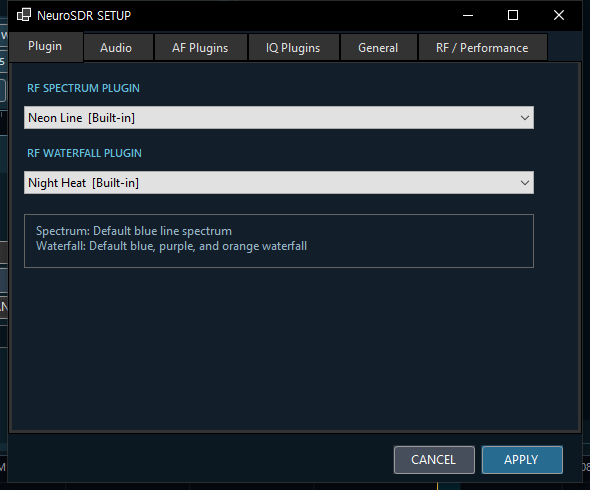
SET → Plugin
- Plugin — Spectrum / waterfall look.
- Audio — Enable OUT1/OUT2, pick waveOut devices.
- AF Plugins — Add FT8, NeuroCaption, CW, SSTV, … and assign each to a VFO.
- IQ Plugins — Pre-demod IQ consumers when enabled.
- General — CW default side, tuner offset, rtl_tcp endpoint, web remote, voice guidance.
- RF / Performance — Sample rate, HackRF amp, SDRplay AGC, display FPS, diagnostics. This tab matters on real hardware.
5. Sidebar recording / memory
- Open IQ WAV / Start IQ Recording — IQ playback and capture.
- Record — AF recording now.
- Smart Record — Scheduled AF jobs.
- Memory / Scan — Memory banks and scanning.
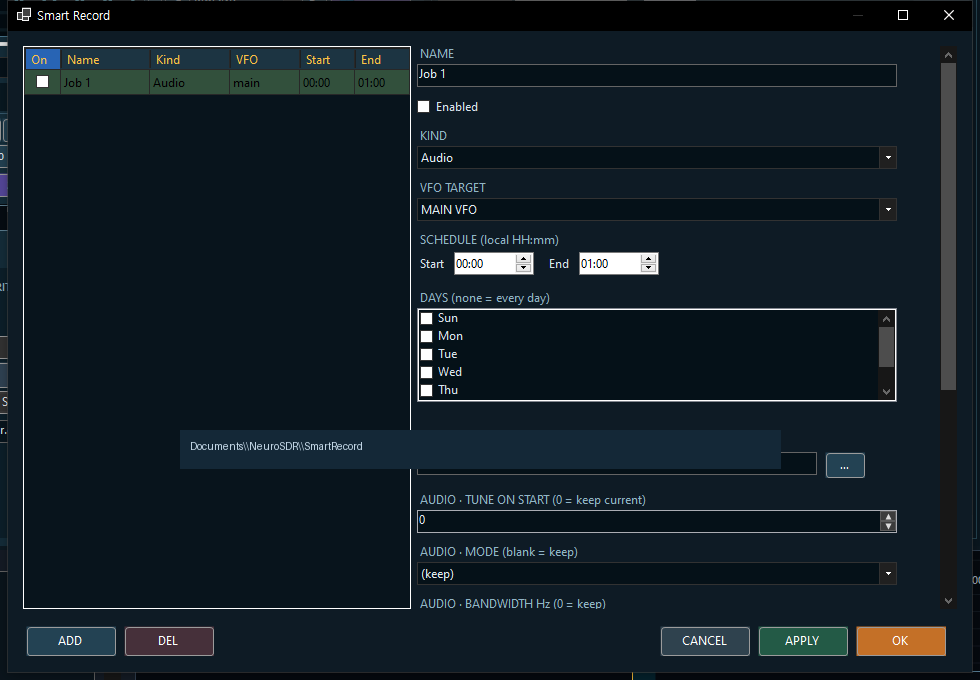
Smart Record schedule editor.
YouTube: Record & Smart REC — 05:32
6. AF strip (VOICE / RNNoise, AF FILTER)
When RX is running, use AGC / NR / notch / AF filter checkboxes as offered, and the RNNoise panel (Apply RNNoise, blanker, blend dry↔processed). These run on demodulated audio from your hardware path.
YouTube: RNNoise tuning — 08:58
YouTube: RNNoise on hardware SDR (verified) — 07:00
7. Suggested first session on a dongle / RSP
- Install API / Zadig (previous post).
- SOURCE = your hardware → RX START.
- SET → Audio → confirm OUT1.
- Mode USB/LSB or NFM as appropriate; BW preset; click waterfall to tune.
- When ready, SET → AF Plugins → add FT8 or NeuroCaption.
Next: captions and AF plugins in depth.
NeuroSDR — KD8CEC · Blog: https://www.hamskey.com · Downloads: GitHub Releases · Source: github.com/phdlee/NeuroSDR
Comments
Post a Comment